 ultimate-guide
AAC Strategies for Non Speaking Learners: 7 Classroom Steps
Table of Contents
- What AAC Strategies Actually Mean for Non Speaking Learners
- AAC Modeling in the Classroom: Show, Don't Quiz
- AAC Classroom Activities That Fit Math and Literacy
- AAC Communication Board Examples You Can Set Up Today
- Encouraging Students to Use AAC Without Pressure
- A Staged Plan for Home and School: From Access to Independence
- Measuring Progress and Troubleshooting Common AAC Barriers
- Frequently Asked Questions
Last Updated: October 19, 2026
What AAC Strategies Actually Mean for Non Speaking Learners
AAC strategies for non speaking learners are the everyday habits adults use to build communication with students who do not rely on speech.
AAC is not a last resort tried after speech therapy stalls.
Augmentative and alternative communication (AAC) is any method that supports or replaces spoken language, from a simple printed picture board to a speech-generating device with thousands of words.
AAC Modeling in the Classroom: Show, Don't Quiz
AAC modeling in the classroom works best when adults treat the system the way they treat speech: they use it constantly, without asking the student to perform. A common mistake is turning modeling into a test.
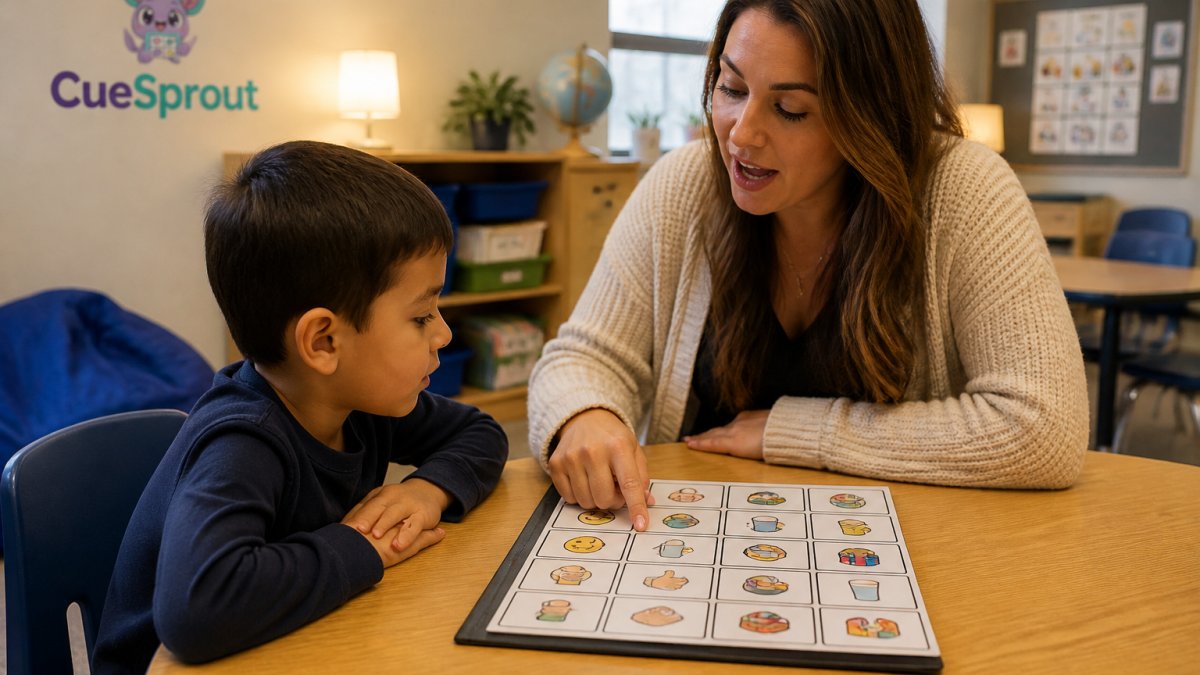
Aided language modeling is the alternative: you point to symbols as you speak, using the student's system, in real moments. Pouring juice, you touch "juice" and "more" while you say them.
Three habits make modeling stick:
- Model during routines you already do, not in a separate session
- Point to one or two words, not a whole sentence, when you are starting out
- Narrate what you are doing out loud so the connection between symbol and meaning is obvious
AAC Classroom Activities That Fit Math and Literacy
AAC classroom activities work best when they slide into lessons you already teach. During math, a student can use a board to choose between two activities, indicate "more" during counting, or answer "how many" with number symbols.
The trick is planning one communication opportunity per lesson, not ten. Pick the moment where a student naturally has something to say, then set up the board so that word is easy to reach.
| Lesson Block | Simple AAC Opportunity | What the Student Practices |
|---|---|---|
| Math counting | Choose between two manipulatives | Choice-making, core vocabulary |
| Read-aloud | Request "again" or "stop" | Communication initiation |
| Centers | Pick a station with a picture card | Self-advocacy, participation |
| Snack or lunch | Request "more" or "finished" | Functional communication |
AAC Communication Board Examples You Can Set Up Today
AAC communication board examples do not need to be complicated, but they do need to match how the student can physically use them.
What matters more than the design is consistency.
Before you print anything, answer one question: how will this student access the board? Access means the physical way a student selects a symbol. Common access methods include:
- Direct selection by pointing. The student points with a finger, fist, or knuckle. This is the most common starting point and works well for students with reliable hand control.
- Direct selection by eye gaze. The student looks at a symbol and a partner confirms it. Eye gaze boards often place symbols around the edges of a clear frame so the partner can see where the student is looking.
- Partner-assisted scanning. A partner points to or reads options one at a time, and the student signals yes or no when the right one comes up. This works for students with limited movement but reliable yes/no signals.
- Switch access. The student presses a large button or switch to select a highlighted option. This is common for students with significant motor differences.
A board that ignores the student's access method will sit unused no matter how well it is designed. A practical starting setup:
- One core board per student, laminated and within arm's reach at all times
- A matching small board for the desk, the rug, and the lunch table
- A lesson-specific strip for math and literacy blocks that clips onto the core board
- A duplicate set for home so families use the same layout
Teams often start with a board that is too large and too crowded. A board with forty symbols looks thorough but can overwhelm a new user and slow down modeling.
guidance on AAC from the American Speech-Language-Hearing Association is a useful reference for families and teachers who want to understand the range of systems available, from low-tech boards to speech-generating devices.
Encouraging Students to Use AAC Without Pressure
Encouraging students to use AAC is mostly about removing pressure, not adding prompts. The students who use their systems most are usually the ones whose adults model constantly and rarely demand a response. Communication initiation, the moment a student starts a message on their own, grows where trying is safe and silence is not treated as failure.
A few moves that help:
- Wait. After you model a word, pause for several seconds and let the student decide whether to respond.
- Respond to every attempt, even imperfect ones. If the student points at the wrong symbol but you can tell what they meant, honor the meaning.
- Offer real choices, not fake ones. "Do you want the red one or the blue one" only works if both are genuinely available.
- Let the student say no. A system that cannot express refusal is not a voice, it is a command board.
A Staged Plan for Home and School: From Access to Independence
A staged plan keeps AAC from becoming an overwhelming project.
Phase 1: Access. Make sure the student has a system they can physically reach and operate, and that every adult in the room knows where it lives. information on assistive technology in schools from the U.S. Department of Education explains how schools approach access and support for students who need communication tools.
Phase 2: Modeling. Adults use the system constantly during routines. No demands, no quizzes.
Phase 3: Participation. The student starts using the system during structured activities with adult support nearby.
Phase 4: Independence. The student initiates communication across settings, including with peers and at home, without an adult prompting first.
The home side matters as much as the school side.
Measuring Progress and Troubleshooting Common AAC Barriers
Progress in AAC is not measured by how much a student speaks. It is measured by how often they communicate, how independently they do it, and how many different reasons they communicate for.
For teams that want a shared definition, these observable indicators work well in a classroom setting:
- Independent communication. The student sends a message without an adult pointing, prompting, or asking a question first.
- Initiation. The student starts an interaction, such as getting a partner's attention or pointing to a symbol before being asked.
- Message variety. The student uses more than one reason to communicate, such as requesting, commenting, refusing, greeting, or asking a question.
- Participation across settings. The student uses the system in more than one place, such as the classroom, lunchroom, and home.
- Partner response. Adults and peers respond to the student's messages as real communication, not as a behavior to correct.
None of these indicators require the student to speak. Speech is not the goal of AAC; communication is. A team that only tracks spoken words will miss most of the progress a student is making.
Common barriers and how to approach them:
- Device availability. If the device is locked in a cabinet or sent home only on Fridays, the student cannot build fluency. The system needs to be available all day, every day. Assign one adult to check the device in and out each morning and afternoon, and keep a low-tech backup board in the student's desk in case the device is charging or unavailable.
- Adults who are not confident. Paraprofessionals often carry the most modeling time but get the least training. A shared modeling guide closes that gap quickly. A one-page guide with three example routines and the exact words to model is usually enough to get a new adult started.
- Peer involvement. Classmates are powerful communication partners. A short introduction to the board, framed as "this is how we talk with our friend," turns peers into models rather than bystanders. A five-minute lesson where the teacher models one word and invites students to try it can shift the classroom culture in a week.
- Multilingual AAC users and English learners. A student's home language belongs on the system too. Communication access in one language only limits what the student can express. Add home-language labels under the English symbols on the same board, so the layout stays consistent and the student can use either language.
- Vocabulary that is missing. If a student keeps trying to say something that is not on the board, that is a signal to add it, not to redirect the student. Keep a small notepad nearby to jot down words students reach for but cannot find, and add them during the next planning period.
the Joint Commission's guidance on patient-provider communication is a reminder that communication access is treated as a right in other settings, and classrooms can hold the same standard.
Frequently Asked Questions
What are effective AAC strategies for nonspeaking learners?
Effective AAC strategies start with modeling, not testing. Adults point to and use the student's AAC system while they talk, every day and across lessons. Pair that with communication opportunities built into routines, wait time after asking a question, and access to the system at all times. Keep goals functional, like requesting, commenting, or choosing, rather than counting words. Consistency matters more than volume, so a short daily routine done every day beats an elaborate plan done once.
How can teachers model AAC during classroom activities?
Modeling means using the AAC system yourself while you speak. During a read-aloud, point to 'book' and 'turn' on the board as you say them. In math, point to 'more' and 'stop.' Keep your hand near the board so students see the connection between spoken words and symbols. Start with two or three core words per activity and repeat them across the week. You do not need to model every word, just show that the system is a real way to communicate.
How do you encourage a student to use AAC without pressuring them?
Create reasons to communicate and then wait. Offer a choice between two items, pause for five to ten seconds, and accept any communication attempt, including a look, reach, or gesture, as valid. Respond right away so the student sees that communicating works. Avoid hand-over-hand forcing or quizzing. Praise the message, not just the device use. Keep the system within reach and model often so the student sees it as normal, not as a test.
What should teachers do when a learner does not respond to AAC modeling?
First, check access. Is the device charged, the board within reach, and the vocabulary relevant to the activity? Then reduce demands and increase wait time. Try modeling without expecting a response for a few days. Look for any signal, such as eye gaze, a reach, or a body movement, and respond to it as communication. If the student still does not engage, talk with the speech-language pathologist about the system fit and whether the vocabulary matches the student's interests.
How can general and special education teachers support AAC together?
Share one plan. Special education teachers and speech-language pathologists can identify two or three core words for the week, and general education teachers can model those same words during math, reading, and transitions. Paraprofessionals need the same one-page guide so everyone responds to communication attempts the same way. A simple shared planning form, like the ones CueSprout offers, keeps expectations consistent across classrooms without adding meetings.
How can teachers make AAC available and easy to use in the classroom?
Keep the system within arm's reach during every lesson, not stored in a cabinet. Place a communication board on the table, tape a small version to the desk, and keep a backup low-tech board for device downtime. Charge devices during breaks and assign a backup charger. Make sure the vocabulary matches what is happening right now, so the student can find words for the lesson. Easy access removes the biggest daily barrier to AAC use.